Whatever format you have, no conversion
No need to convert your archive to one specific format or set aside files it doesn't support. The panel reads every common sound-effect format directly:
WAVMP3FLACOGGAIFAIFFM4A
 Works with Premiere Pro — v1.0
No more switching between Finder and Premiere. Sound Picker opens your sound folder right inside the panel — search, preview, and one click drops it exactly where your playhead sits on the timeline.
Most sound panels lock you into their own bundled pack. Sound Picker works the other way around: it connects to the archive you've spent years building and makes it usable.
No need to convert your archive to one specific format or set aside files it doesn't support. The panel reads every common sound-effect format directly:
In practice, every editor works with a couple dozen specific sounds, not the whole archive. Without you doing a thing, the panel tracks which sounds you drop on the timeline most and keeps them pinned in their own tab up top.
So for your go-to sounds you never dig through thousands of files — they're right in front of you from the start. There's also a favorites tab for anything you want to pin yourself.
The panel works directly on your own effects folder — nothing to import or move around.
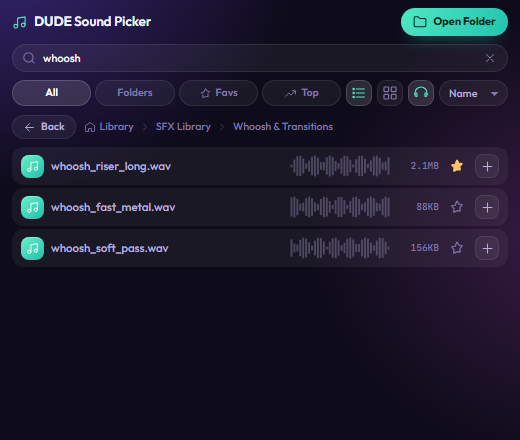
Type the effect's name and see the result instantly. No more digging through dozens of folders for one sound.
Browse your library's folder structure with the path bar up top, or hit "All" to see every sound at once.
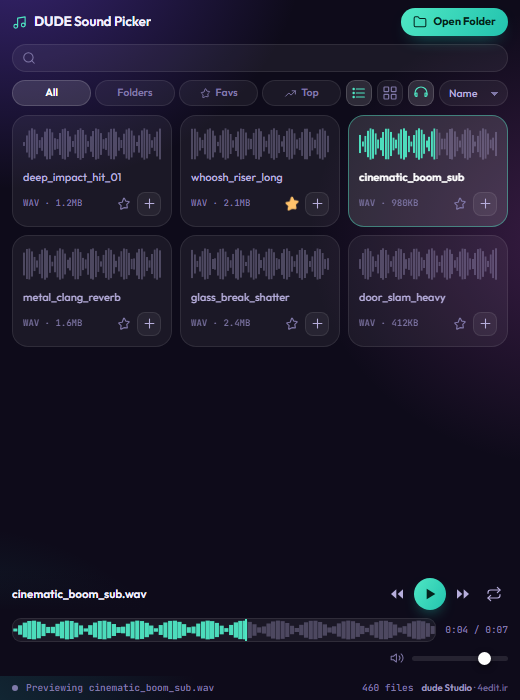
Listen with a waveform display before dropping it on the timeline — with volume control and auto-loop.
Star the sounds you use constantly so they always stay at the top of the list, one click away.
The sound lands exactly at your playhead on the first free audio track — without breaking your existing clips.
Imported files land in their own dedicated bin, so your project panel never gets cluttered.
Sound Picker inside Premiere: browsing the library, preview, and timeline insert.
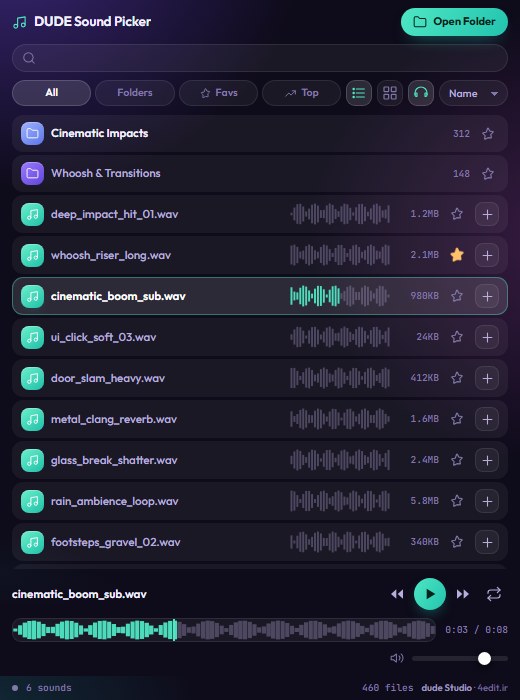
Sound design is a big chunk of editing time, and most of it isn't spent on the actual work — it's spent hunting for the file. Remove that search, and those same hours go straight into the next job.
The back-of-the-envelope math is simple: if you spend half an hour per project finding and placing sound, and you do ten projects a month, that's several hours a month — capacity for more projects, or faster delivery on the ones you already have. The license usually pays for itself within a project or two.
The whole process is automatic; right after a successful payment, your activation key is shown in the browser instantly.
Click "Buy License" and pay through the secure Zibal gateway.
Right after payment, your activation key is shown on screen (and emailed to you too).
Open the Sound Picker panel in Premiere, enter the key, and hit "Activate." Done.
The license activates on one machine, and once activated it works even without an internet connection.
Premiere ProLooking for an After Effects tool? Check out DUDE BOX
No. Sound Picker works on your own sound library — you point it at your effects folder and browse and use it straight from there.
WAV, MP3, FLAC, OGG, AIF, AIFF and M4A — basically anything you'd find in a sound effects archive. No need to convert your files or touch your archive at all.
Current Premiere Pro versions that support CEP extensions (CC 2019 and later). If you're not sure, ask support before buying.
Every time you drop a sound on the timeline, the panel counts it automatically. A separate tab keeps sounds sorted by most-used (or newest), so your go-to sounds are within reach without searching. You can remove any item from this list too.
At the playhead, on the first audio track that's free at that point. If no track is free, the panel picks a suitable one on its own so nothing in your project gets overwritten.
No. The first activation needs an internet connection once, but after that the panel works offline.
No. Each product has its own independent license and must be purchased separately.
Get your Sound Picker license now and have your library right inside Premiere.
Buy Sound Picker — 290,000 Toman